


Quick Links
Quick Links![]()
Quick Links
-
Middle School Math Advancement - SRVUSD Math Page
-
Incoming 7th and 8th grade Course Selection Information
-
8th grade Summer Advancement Via outside Institutions - Information
-
2026 High School Events - Click Here
-
Enrollment information / Transcript -Click here
Where can I see my Student's Grades?
Where can I see my Student's Grades?![]()
Where can I see my Student's Grades?
Infinite Campus and Google Classroom are the best ways to check your student's grades.
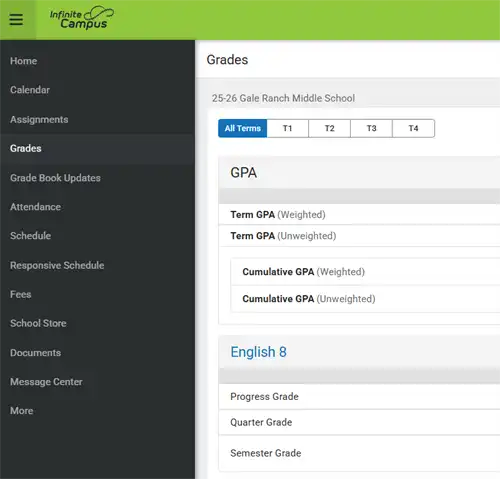
Here are the step by step instructions to look for grades in Infinite Campus Parent Portal.
1) Click on this link Parent Infinite Campus .
2) Log in with your username and password. If you have trouble logging in please submit an IT ticket.
3) Click on "Grades" on the left side and click on "All terms" on the main page.
SchooLinks:
SchooLinks:![]()
SchooLinks:
SchooLinks is a college and career readiness platform that helps K-12 students explore future options, plan their education, and manage college applications. It provides tools for career interest and skills assessments, college and scholarship searches, virtual tours, and building resumes and portfolios.
Complete the SchooLinks Onboarding for Guardians by following the directions.
8th graders will begin developing their personalized 4-year academic plans in SchooLinks on Monday, March 16. During their PE periods, counselors will guide students through exploring their interests and setting long-term goals. This proactive planning ensures every student is prepared for final reviews with their future SRVUSD high school counselors.


